Canvas API
The Xui Canvas API is modeled after the HTML5 Canvas 2D Context API. If you know the browser API, you already know most of Xui's drawing primitives.
IContext is the aggregate interface. You receive it in View.RenderCore:
protected override void RenderCore(IContext context)
{
    // draw here
}
Fill and stroke styles
Set fill or stroke before drawing. Styles are ref struct values — no boxing.
// Solid color
context.SetFill(Colors.CornflowerBlue);
context.SetStroke(new Color(0xFF, 0x00, 0x00, 0xFF));

// Linear gradient
context.SetFill(new LinearGradient(
    start:    new Point(0, 0),
    end:      new Point(300, 0),
    gradient: [new(0f, Colors.Purple), new(1f, Colors.Cyan)]));

// Image pattern (equivalent to ctx.createPattern in browser)
IImage img = this.GetService<IImage>();
img.Load("Assets/tile.png");
context.SetFill(new ImagePattern(img, PatternRepeat.Repeat));
Rectangles
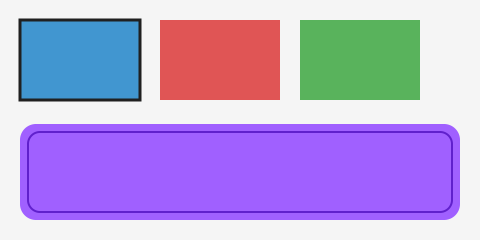
Rounded rectangles use a path + fill/stroke cycle:
context.FillRect(new Rect(10, 10, 200, 100));
context.StrokeRect(new Rect(10, 10, 200, 100));

context.BeginPath();
context.RoundRect(new Rect(10, 130, 200, 80), cornerRadius: 16);
context.Fill(FillRule.NonZero);
Paths
Build a path with BeginPath, add segments, then call Fill and/or Stroke.
context.BeginPath();
context.MoveTo(new Point(50, 50));
context.LineTo(new Point(150, 50));
context.LineTo(new Point(100, 120));
context.ClosePath();
context.Fill(FillRule.EvenOdd);
context.Stroke();
Curves:
context.CurveTo(cp1, cp2, to);          // cubic Bézier
context.CurveTo(cp1, to);               // quadratic Bézier
context.Arc(center, radius, startAngle, endAngle, Winding.Clockwise);
context.ArcTo(cp1, cp2, radius);
context.Ellipse(center, rx, ry, rotation, startAngle, endAngle, winding);
context.RoundRect(rect, cornerRadius);

Gradients
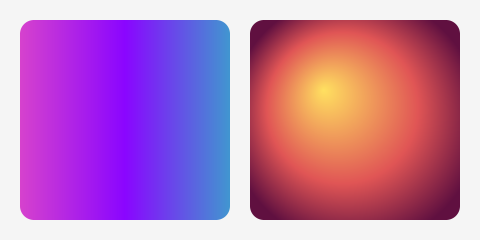
Gradients are ref structs — constructed inline, no allocation.
context.SetFill(new LinearGradient(
    start:    new Point(0, 0),
    end:      new Point(300, 0),
    gradient: [new(0f, Colors.DeepPink), new(1f, Colors.Blue)]));

context.SetFill(new RadialGradient(
    startCenter:   new Point(150, 100),
    startRadius:   0,
    endCenter:     new Point(150, 100),
    endRadius:     120,
    gradientStops: [new(0f, Colors.Yellow), new(1f, Colors.Red)]));
Clipping
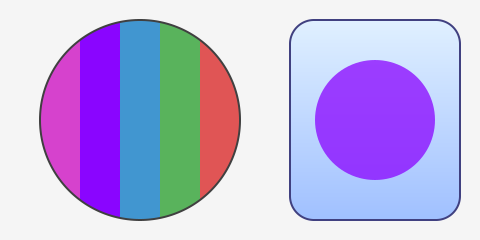
Clip() restricts drawing to the current path. Save/Restore scope the clip.
context.Save();

context.BeginPath();
context.Arc(center, radius, 0, 2 * NFloat.Pi, Winding.ClockWise);
context.Clip();                 // all subsequent draws masked to circle

// ... draw inside the circle ...

context.Restore();              // clip released
Transforms
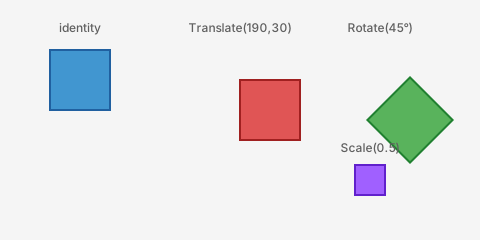
All transforms compose on the current matrix. Save/Restore stack them.
context.Save();
context.Translate((100, 50));
context.Rotate(NFloat.Pi / 4);
context.Scale((2f, 2f));
// ... draw ...
context.Restore();
Images
context.DrawImage(image, destRect);
context.DrawImage(image, destRect, opacity);
context.DrawImage(image, sourceRect, destRect, opacity);
See Image Loading for how to acquire and load IImage handles.
Line style
context.LineWidth   = 2f;
context.LineCap     = LineCap.Round;
context.LineJoin    = LineJoin.Round;
context.MiterLimit  = 10f;
context.SetLineDash([8f, 4f]);          // ReadOnlySpan<nfloat>
context.LineDashOffset = 2f;
Text
context.SetFont(new Font(16, ["Inter"], FontWeight.Normal));
context.TextAlign    = TextAlign.Left;
context.TextBaseline = TextBaseline.Alphabetic;
context.SetFill(Colors.Black);
context.FillText("Hello", new Point(20, 40));

var metrics = context.MeasureText("Hello");
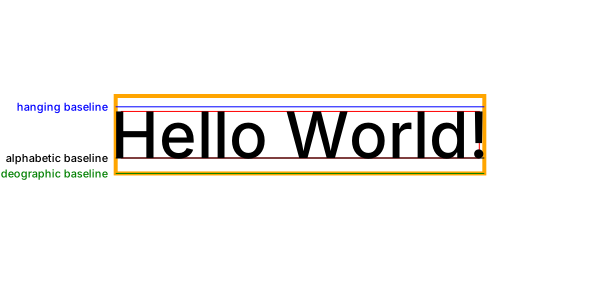
MeasureText returns the glyph, font, and baseline metrics used for precise placement and diagnostics. Select the font before measuring, then use the same font to render the text:
context.SetFont(new Font(64, ["Inter"], FontWeight.Normal));
context.TextAlign = TextAlign.Center;
context.TextBaseline = TextBaseline.Alphabetic;

var metrics = context.MeasureText("Hello World!");
context.FillText("Hello World!", new Point(300, 158));
The figure shows the Inter 64 px metrics emitted by that code. The red rectangle is the actual glyph bound, green is the em height, and orange is the font bounding box. The baseline labels hang below the lines they describe.
Sub-interfaces
IContext is composed of these sub-interfaces — useful for narrowing what a helper method needs:
| Interface | Responsibility |
|---|---|
IPenContext |
Fill/stroke styles, line width, dash, caps/joins |
IPathBuilder |
BeginPath, MoveTo, LineTo, CurveTo, Arc, ClosePath |
IPathDrawing |
Fill, Stroke |
IPathClipping |
Clip |
IRectDrawingContext |
FillRect, StrokeRect, ClearRect |
IImageDrawingContext |
DrawImage overloads |
ITextDrawingContext |
FillText |
ITextMeasureContext |
MeasureText, SetFont |
ITransformContext |
Translate, Rotate, Scale, SetTransform, Transform |
IStateContext |
Save, Restore |